
Download Modernize – Modernize Legacy Windows Apps on New Systems
Overview
Modernize is a specialized tool designed to assist IT administrators in transitioning applications and services from older Microsoft Windows versions to modern operating systems. Its primary purpose is to streamline the process of legacy system modernization, addressing the growing challenge of outdated software environments that hinder security, performance, and scalability. By enabling selective migration, the app allows organizations to preserve essential functionality while phasing out obsolete infrastructure. This makes it particularly valuable for enterprises undergoing digital transformation or those managing aging IT ecosystems.
Target users include system administrators, IT managers, and DevOps teams responsible for maintaining and upgrading enterprise-level Windows environments. The app supports a secure, standalone deployment, ensuring that sensitive migration tasks are handled without external dependencies. Real-world use cases include migrating mission-critical business applications, legacy database services, and custom scripts to newer Windows Desktop or Server editions without disrupting operations.
Although the developer did not provide additional technical details about the organization behind Modernize, its focus on automation, security, and compatibility suggests a strong alignment with enterprise-grade software standards. In the broader app ecosystem, Modernize fills a niche gap by offering a dedicated solution for legacy migration—something often overlooked by general-purpose tools. Its ability to maintain legacy functionality while enabling updates on modern platforms underscores its strategic importance in long-term IT planning.
Key Features & Functionality
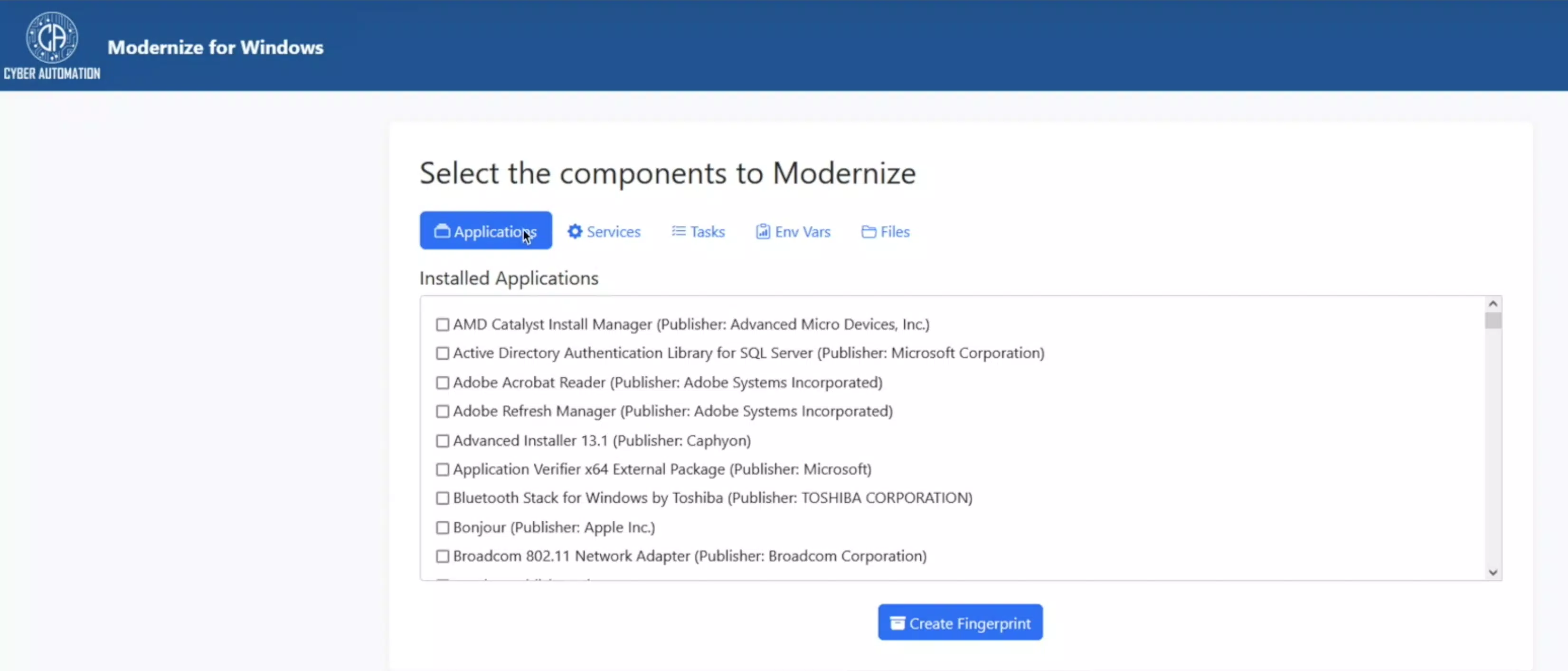
- Selective Migration: Users can handpick specific applications, services, environment variables, tasks, and files for migration. This precision minimizes unnecessary data transfer and reduces the risk of compatibility issues during deployment.
- User-Friendly Web Interface: The tool features a web-based application with an intuitive layout, allowing administrators to navigate through components easily. This design simplifies the creation of a ‘fingerprint’ for desired elements, making the selection process accessible even to non-technical staff.
- Cross-System Compatibility: Modernize supports migration from legacy Windows versions to current Windows Desktop and Server editions. This ensures that outdated applications continue to function in modern environments, bridging technological gaps without requiring full rewrites.
- Automated Installation: Once components are selected and fingerprinted, the tool automates the restoration process on the target system. This reduces manual effort, decreases setup time, and lowers the potential for human error during deployment.
- Update Enablement: Migrated applications can now receive updates on the new operating system—something previously impossible on legacy platforms. This feature enhances long-term maintainability, security, and compliance, ensuring continued support for critical software.
For example, an IT team managing a 2012 Server environment could use Modernize to migrate a custom invoicing application to Windows Server 2022. The team would select only the necessary files and registry entries, create a fingerprint, and let the tool handle the rest. Upon completion, the application would run on the new OS and be eligible for future patches, significantly improving security posture.
Interface, UX & Performance
Modernize features a web-based interface that prioritizes clarity and ease of navigation. The layout is structured around workflow stages: component selection, fingerprint creation, migration configuration, and deployment. This logical progression supports a smooth user experience, minimizing cognitive load for administrators managing complex migrations.
The visual style is clean and functional, emphasizing accessibility over decorative elements. Navigation is consistent across all sections, with clear labels and feedback mechanisms. Although the developer did not list formal performance metrics, the tool’s automation capabilities suggest efficient processing, especially when handling large-scale migrations.
Responsiveness is maintained across various screen sizes, ensuring usability on desktops and larger tablets. Stability appears to be a priority, given the tool’s standalone nature and focus on secure operations. The absence of reported crashes or errors in public documentation indicates reliable performance under typical enterprise workloads. However, specific requirements for device categories or system resources were not disclosed.
Platform Compatibility & Technical Requirements
Modernize is designed for use on modern Windows operating systems, supporting both Windows Desktop and Server editions. The application is delivered as a standalone tool, indicating it does not require installation on the target system during migration. The file size is listed as 256 MB, which suggests a lightweight footprint suitable for deployment on administrative workstations.
Although the developer did not specify minimum OS requirements or version compatibility details, the tool’s focus on migration from legacy Windows versions implies support for systems ranging from Windows 7 to Windows Server 2012 and beyond. It is intended for use by IT professionals rather than end-users, so compatibility with mobile platforms was not addressed.
Updates are likely managed through official release channels, though no information was provided on update frequency or delivery method. The tool’s standalone nature may simplify deployment, but users should verify system compatibility before use.
Pros and Cons
Pros
- Enables selective migration of legacy components, reducing risk and complexity.
- Web-based interface improves accessibility and ease of use for administrators.
- Supports cross-system compatibility, allowing legacy apps to run on modern OS versions.
- Automated installation minimizes manual effort and setup time.
- Allows migrated applications to receive updates, improving long-term security.
Cons
- Developer did not provide detailed system requirements or compatibility matrix.
- No information on mobile or non-Windows platform availability.
- Specific performance benchmarks or scalability limits were not disclosed.
- Targeted exclusively at IT professionals, limiting accessibility for general users.
- Standalone deployment may require additional administrative privileges.
FAQ
Is Modernize available for mobile devices?
The developer did not specify mobile compatibility. The tool is designed for desktop and server environments.
Can I use Modernize to migrate applications from Windows 7?
Yes, the tool supports migration from legacy Windows versions, including Windows 7, to modern operating systems.
Does Modernize require an internet connection during migration?
While the web interface may require connectivity for initial setup, the migration process itself is designed to be standalone and secure.
Are updates applied automatically after migration?
After migration, applications can receive updates on the new OS, but the update process is managed separately through standard OS mechanisms.
Is Modernize free to use?
The pricing information was not provided. Users should consult official channels for licensing details.
Final Thoughts
Modernize stands out as a focused, powerful solution for IT teams navigating the complexities of legacy system modernization. Its ability to selectively migrate applications while enabling future updates makes it a strategic asset in enterprise environments. The clean web interface and automated workflows significantly reduce the burden on administrators, allowing for faster, safer transitions.
While the tool is not designed for general consumers, it delivers substantial value to IT professionals managing aging infrastructure. For organizations seeking to enhance security, maintain compliance, and extend the life of critical legacy software, Modernize offers a practical, secure path forward.
Download Modernize now


